Difficult to Select Object Behind Transparent Clipping Group
-
Please open this file:
0_1686443580786_Difficult_to_Select_Object_Behind_Transparent_Clipping_Group.vstyler
To select the rectangle behind the transparent clipping group, I have to click it twice. If I hold Shift key to select the transparent clipping group and the rectangle, I cannot select the rectangle.
Is there an option to select the rectangle directly, without clicking it twice or using the intersecting selection option?
-
@gotanidea Here Option-clicking twice gets to the small rectangle.
Is it working without Option there? -
@b77 Yes, I have to click the rectangle twice to select it. The workflow makes me unable to select the transparent clipping group and the rectangle by holding Shift key.
In Freehand and Illustrator, I can directly select the rectangle without clicking it twice. How to do it in VectorStyler?
-
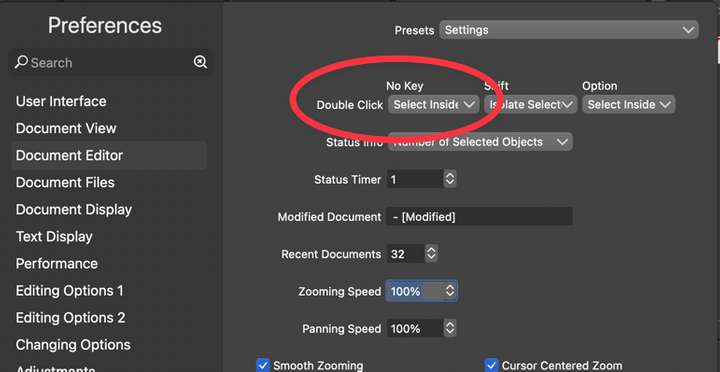
I was testing out the double click options in preferences. I made the simple double click be "select inside" and it does not seem to work. If I double click on something visible that is inside another shape, it will not seem to do anything. I also made the option-double click also "select inside" and that works just fine. So it seems the double click by itself option is not functioning as it should in this setup. I will check some others and see how the perform