VectorStyler
    • Categories
    • Unread
    • Recent
    • Tags
    • Popular
    • Register
    • Login

    Break apart the dashed line into individual elements.

    Scheduled Pinned Locked Moved Questions and Support
    16 Posts 4 Posters 12.0k Views 4 Watching
    Loading More Posts
    • Oldest to Newest
    • Newest to Oldest
    • Most Votes
    Reply
    • Reply as topic
    Log in to reply
    This topic has been deleted. Only users with topic management privileges can see it.
    • VectorStylerV Offline
      VectorStyler @encart
      last edited by

      @encart When editing the dash in the modal view, uncheck the Relative to Width option and set the dash/gap lengths in pt

      IgullI 1 Reply Last reply Reply Quote 1
      • IgullI Offline
        Igull @VectorStyler
        last edited by

        @VectorStyler

        I have the same issue as @encart and probably the same perforation cutting issue requirement 🙂

        I've done as you suggest, but the actual line still remains continuous when viewed in preview mode ?

        Having to move to points rather than stay in the document units (millimetres in my case) seems a strange solution ?

        Neil

        iMac 27" 2015 Catalina 32Gb, MacBook Pro 13" 2016 Monterey 8Gb, Mac Mini M2 2023 8Gb

        encartE b77B VectorStylerV 3 Replies Last reply Reply Quote 0
        • encartE Offline
          encart @Igull
          last edited by

          @Igull Here is a way that works for me : https://recordit.co/JMmXdttLhG

          MacBook Air M4 24Gb, Tahoe 26.2

          IgullI 1 Reply Last reply Reply Quote 1
          • b77B Offline
            b77 @Igull
            last edited by b77

            @Igull said in Break apart the dashed line into individual elements.:

            Having to move to points rather than stay in the document units (millimetres in my case) seems a strange solution ?

            If you mean the stroke width unit should be the same as the document units (mm), you need to
            disable 'Convert Stroke Widths to Unit' in Preferences > Size Presets.

            MacBook Pro (Intel) running Monterey 12.6.4

            IgullI 1 Reply Last reply Reply Quote 0
            • VectorStylerV Offline
              VectorStyler @Igull
              last edited by

              @Igull No need to move to points, that was just an example.

              1 Reply Last reply Reply Quote 0
              • IgullI Offline
                Igull @b77
                last edited by

                @b77 said in Break apart the dashed line into individual elements.:

                @Igull said in Break apart the dashed line into individual elements.:

                Having to move to points rather than stay in the document units (millimetres in my case) seems a strange solution ?

                If you mean the stroke width unit should be the same as the document units (mm), you need to
                disable 'Convert Stroke Widths to Unit' in Preferences > Size Presets.

                OK, I see where that's coming from, it's nothing to do with points 🙂

                Neil

                iMac 27" 2015 Catalina 32Gb, MacBook Pro 13" 2016 Monterey 8Gb, Mac Mini M2 2023 8Gb

                1 Reply Last reply Reply Quote 0
                • IgullI Offline
                  Igull @encart
                  last edited by

                  @encart said in Break apart the dashed line into individual elements.:

                  @Igull Here is a way that works for me : https://recordit.co/JMmXdttLhG

                  OK, got it, thanks !

                  Unfortunately, by expanding the stroke, the dashes end up as small rectangles rather than as single lines - picking up the outline of the stroke width.
                  Understandably, expanding the stroke width would produce that - it doesn't work at zero stroke width sadly which might have been a workaround 🙂

                  It would be great if there was an option to expand the stroke as simply lines of any thickness rather than outlining the current stroke. During the cutting process, the outlined strokes would be cut as rectangles rather than as lines - doubling the cutting times and most likely over-burning the material if the line "rectangles" were say hairline.

                  AI has the same issue, I never found a satisfactory way to do this other than writing a small script that created true individual physical dashed lines rather than a visual style.

                  Neil

                  iMac 27" 2015 Catalina 32Gb, MacBook Pro 13" 2016 Monterey 8Gb, Mac Mini M2 2023 8Gb

                  VectorStylerV 1 Reply Last reply Reply Quote 0
                  • VectorStylerV Offline
                    VectorStyler @Igull
                    last edited by

                    @Igull said in Break apart the dashed line into individual elements.:

                    by expanding the stroke, the dashes end up as small rectangles rather than as single lines

                    This is why we have to set it to Hairline (zero) width

                    IgullI 1 Reply Last reply Reply Quote 1
                    • IgullI Offline
                      Igull @VectorStyler
                      last edited by

                      @VectorStyler said in Break apart the dashed line into individual elements.:

                      This is why we have to set it to Hairline (zero) width

                      Mmmm, my stroke set doesn't include hairline, it starts at NONE, 0.05mm, 0.1mm etc - I have "Convert Stroke Widths to Unit" checked in Size Presets/Stroke Width.

                      I've just done a prefs reset back to default and I can confirm it works using "hairline". However, that option isn't available when stroke widths are converted and neither NONE or 0.05mm work - NONE won't allow a dashed effect and 0.05mm produces rectangles 😞

                      A bug ??

                      Neil

                      iMac 27" 2015 Catalina 32Gb, MacBook Pro 13" 2016 Monterey 8Gb, Mac Mini M2 2023 8Gb

                      VectorStylerV 1 Reply Last reply Reply Quote 0
                      • VectorStylerV Offline
                        VectorStyler @Igull
                        last edited by

                        @Igull Not a bug, since it can be removed in preferences. But if you type 0.0 as a width then it should set it to hairline.

                        IgullI 1 Reply Last reply Reply Quote 0
                        • IgullI Offline
                          Igull @VectorStyler
                          last edited by

                          @VectorStyler said in Break apart the dashed line into individual elements.:

                          But if you type 0.0 as a width then it should set it to hairline.

                          You can certainly type the stroke width 0.0 in the stroke size edit box and that will work as a 'hairline' (whatever size that is in mm's ???).
                          However, if you wish to add a 0.0 stroke width to the stroke width presets, then the smallest it will accept is 0.05mm 😞

                          Neil

                          iMac 27" 2015 Catalina 32Gb, MacBook Pro 13" 2016 Monterey 8Gb, Mac Mini M2 2023 8Gb

                          VectorStylerV 1 Reply Last reply Reply Quote 1
                          • VectorStylerV Offline
                            VectorStyler @Igull
                            last edited by

                            @Igull said in Break apart the dashed line into individual elements.:

                            However, if you wish to add a 0.0 stroke width to the stroke width presets, then the smallest it will accept is 0.05mm

                            This seems to be a bug. Will be fixed ASAP.

                            1 Reply Last reply Reply Quote 0
                            • encartE Offline
                              encart
                              last edited by

                              @VectorStyler What do you think about adding Expand Dash as a feature?
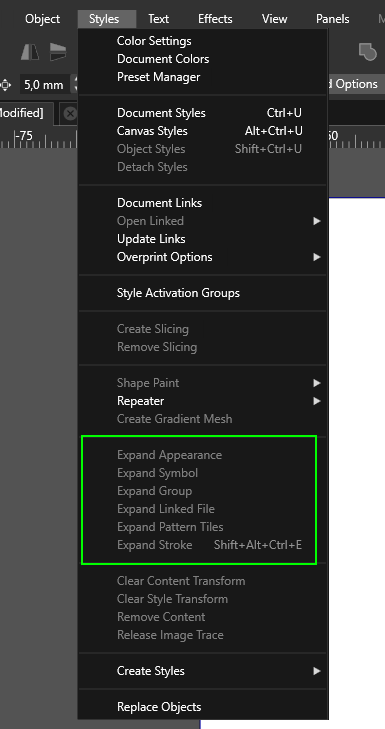
                              0_1684409180078_screenshot_20230518_132602.png

                              MacBook Air M4 24Gb, Tahoe 26.2

                              VectorStylerV 1 Reply Last reply Reply Quote 0
                              • VectorStylerV Offline
                                VectorStyler @encart
                                last edited by

                                @encart said in Break apart the dashed line into individual elements.:

                                What do you think about adding Expand Dash as a feature?

                                I actually added this (quietly) to the backlog 2 days ago 🙂

                                encartE 1 Reply Last reply Reply Quote 3
                                • encartE Offline
                                  encart @VectorStyler
                                  last edited by

                                  @VectorStyler Great, thank you! 👏

                                  MacBook Air M4 24Gb, Tahoe 26.2

                                  1 Reply Last reply Reply Quote 0
                                  • First post
                                    Last post
