VectorStyler
    • Categories
    • Unread
    • Recent
    • Tags
    • Popular
    • Register
    • Login

    width dialogs

    Scheduled Pinned Locked Moved Questions and Support
    3 Posts 2 Posters 3.1k Views 2 Watching
    Loading More Posts
    • Oldest to Newest
    • Newest to Oldest
    • Most Votes
    Reply
    • Reply as topic
    Log in to reply
    This topic has been deleted. Only users with topic management privileges can see it.
    • T Offline
      ti
      last edited by

      How do I access the options dialogs for changing settings of Stroke Width Tool, Stroke Width Brush, Width Smooth, and Width Eraser? I tried double-clicking the Width Brush icon in the toolbox, but that brings up the Stroke Width Panel:
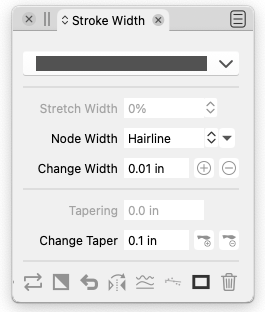
      0_1670860847841_Screen Shot 2022-12-12 at 11.00.29 AM.png

      rather than the tool options that I need to change:
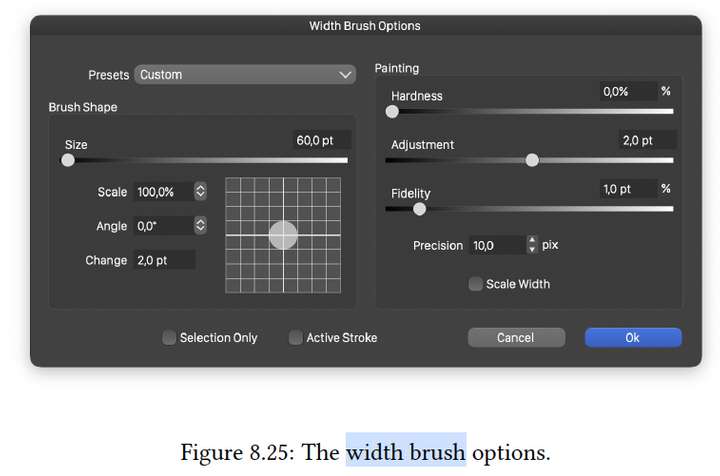
      0_1670860881341_Screen Shot 2022-12-12 at 11.01.14 AM.png

      VectorStylerV 1 Reply Last reply Reply Quote 0
      • VectorStylerV Offline
        VectorStyler @ti
        last edited by

        @ti There seems to be a bug here, as only the width tool should open the panel, the other should open this options view.
        The fix will be in the next build.

        T 1 Reply Last reply Reply Quote 0
        • T Offline
          ti @VectorStyler
          last edited by

          @VectorStyler Thanks for getting on it. Looking forward to the next build!

          1 Reply Last reply Reply Quote 0
          • First post
            Last post