VS Internal Font Manager Dependent on 3rd Party Font Manager
-
I'm playing around with the font manager inside VS and I'm excited about the possibilities for using it. As I experimented with creating groups and adding fonts to them, I saw that the fonts were only active if they were also active in the 3rd party font manager, in my case, "Typeface"
Ideally, I think I would want VS to be able to activate the fonts independently of any 3rd party font manager, because it otherwise does not help the workflow much. Any font I want to go use in VS, I'd have to first go be sure it was turned on in the 3rd party font manager.The fonts themselves are stored and organized in a system of standard folders on my mac. They are not embedded in the 3rd party font manager. So in my non-developer mind, there should be a way to circumvent the 3rd party font manager and let VS act as it's own font activator independently.
That said, I still would want the 3rd party font manager to be able to control fonts displayed in VS overall - but allow specifically chosen fonts inside the internal VS font manager to remain autonomous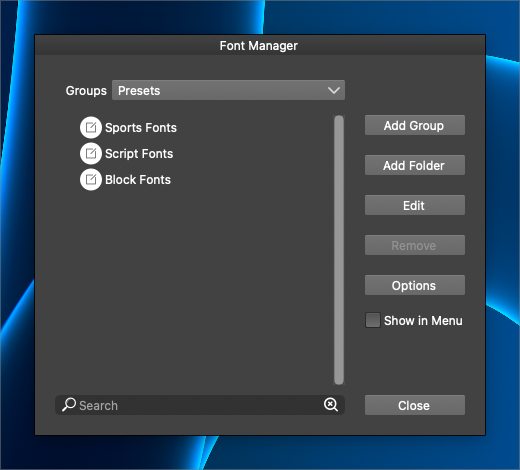
🍎 macOS Tahoe 26.2, Mac mini (M1, 2020), Chip Apple M1, Memory 16 GB
Cintiq 27QHD Display and LG Ultra HD Display -
@Boldline Groups are created from already installed fonts (by 3rd party or VS font manager). This feature is used to create smaller font collections specific to projects.
To add fonts with the VS font manager, select "Add Folder" and select the folder where the fonts are.
-
@VectorStyler Ok that makes sense. If I can go a little deeper with this - what if I only want certain fonts inside those folders, but not all fonts in the folders? Could there be a way to pick and choose the fonts and not just do it by total folder?
One problem I see is that these font folders have multiple font file types, such as .ttf and .otf. I would not want both to be activated and available in VS all the time. -
@Boldline Add a folder first, this will add all fonts in that folder.
Then select Add Group and in the "Collection" field (top-right) select the name of that folder.
Now you can pick specific fonts from that folder to create a limited group. -
@VectorStyler ok, I'm following your thinking. Would there be adverse affects from adding the fill folder in terms of memory? would adding the full folder automatically activate all fonts in the folder? I ask because my folders have many 1000's of fonts
-
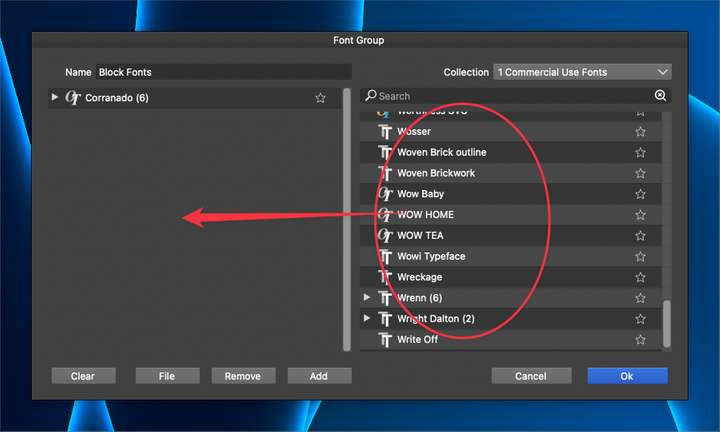
Sharing my initial first time use with the Font Group panel, I was expecting to be able to equally drag and drop the fonts from the source list on the right side over to the font group on the left.
With the buttons, I initially did not see the "add" option and mistook the "ok" button for adding. It took me a couple attempts to realize I was not pressing the "add" button first and that was why they were not in the new group. Makes total sense now, but it was not totally clear the first time for me. Maybe "ok" should be "accept"? Not claiming I know what's best here.I went back in to add more fonts to the existing group and again I almost clicked the "ok" button thinking it would add them. Maybe because the "ok" button is blue? the "add" button is not prominent
Could drag and drop eventually be added to this operation?
-
@Boldline said in VS Internal Font Manager Dependent on 3rd Party Font Manager:
Could drag and drop eventually be added to this operation?
Added this to the backlog.
-
@Boldline An other way to create a font group with font files (that are not added to any font manager) is to drag&drop one or more font files into the list on the left side of the font group editors.
Or to use the "Files" button and select one or more font files. -
@VectorStyler This is perfect! I love having both options - where I can connect an entire font folder to VS and the option to create custom groups referencing fonts not found in VS already in another folder.
I had tried adding entire large folders of fonts directly and it slowed down VS because the folders contained 30k fonts each. I was able to import a few smaller sized folders like google fonts and then also create groups based on foundry or font style and put just my favorites in there for easy access. love it! -
@Boldline said in VS Internal Font Manager Dependent on 3rd Party Font Manager:
folders contained 30k fonts each
Yes, this may cause slowdowns.

