VectorStyler
    • Categories
    • Unread
    • Recent
    • Tags
    • Popular
    • Register
    • Login

    Document in "mm" & text in "mm"

    Scheduled Pinned Locked Moved Questions and Support
    4 Posts 2 Posters 3.7k Views 2 Watching
    Loading More Posts
    • Oldest to Newest
    • Newest to Oldest
    • Most Votes
    Reply
    • Reply as topic
    Log in to reply
    This topic has been deleted. Only users with topic management privileges can see it.
    • B Offline
      B-Vs-V
      last edited by B-Vs-V

      I have created a document in mm and I notice that the text is also in mm. For the latter I would like it to be in pt as usual. Where do I change this and how do I make the text always in pt even when the document is designed with another reference?

      Also, how do you adjust the frame to the text? With Affinity apps, you simply double click on the frame circle.

      Thanks
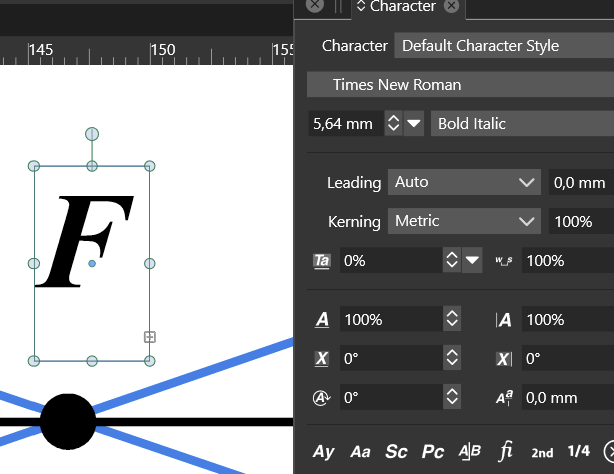
      0_1668165834002_7a27307e-7429-41f8-90f8-0f4024627b09-image.png

      W11 Pro 25H2 - 12th Gen Intel(R) i7-12700K 3.61 GHz - RAM 64 Go - NVIDIA GF GTX 4070 Ti - Intuos - Dell UP3216Q / Eizo ColorEdge
      W11 Pro 25H2 - 12th Gen Intel(R) i7-12700KF 3.60 GHz -RAM 64 Go - NVIDIA GF GTX 3080 - IntuosPro- ProArt PA329C

      VectorStylerV 1 Reply Last reply Reply Quote 0
      • VectorStylerV Offline
        VectorStyler @B-Vs-V
        last edited by

        @PatrickM Preferences -> Number Editors -> Font Size Units

        B 1 Reply Last reply Reply Quote 1
        • B Offline
          B-Vs-V @VectorStyler
          last edited by

          @VectorStyler Thanks, there are so many preference options that I am learning on the job ☺

          Also, how can I adjust the frame to the text? With Affinity apps, one simply double click on the frame circle.

          W11 Pro 25H2 - 12th Gen Intel(R) i7-12700K 3.61 GHz - RAM 64 Go - NVIDIA GF GTX 4070 Ti - Intuos - Dell UP3216Q / Eizo ColorEdge
          W11 Pro 25H2 - 12th Gen Intel(R) i7-12700KF 3.60 GHz -RAM 64 Go - NVIDIA GF GTX 3080 - IntuosPro- ProArt PA329C

          VectorStylerV 1 Reply Last reply Reply Quote 0
          • VectorStylerV Offline
            VectorStyler @B-Vs-V
            last edited by

            @PatrickM said in Document in "mm" & text in "mm":

            Also, how can I adjust the frame to the text?

            No such option in VS, for now.

            1 Reply Last reply Reply Quote 1
            • First post
              Last post