VectorStyler
    • Categories
    • Unread
    • Recent
    • Tags
    • Popular
    • Register
    • Login

    How to move several objects in once in the layer panel from a layer to another?

    Scheduled Pinned Locked Moved Questions and Support
    6 Posts 2 Posters 5.6k Views 2 Watching
    Loading More Posts
    • Oldest to Newest
    • Newest to Oldest
    • Most Votes
    Reply
    • Reply as topic
    Log in to reply
    This topic has been deleted. Only users with topic management privileges can see it.
    • B Offline
      B-Vs-V
      last edited by

      Another simple question: how to move several objects from one layer to another in one go and not object by object?

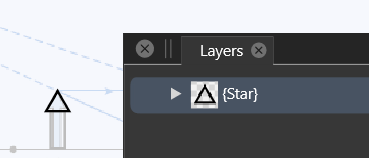
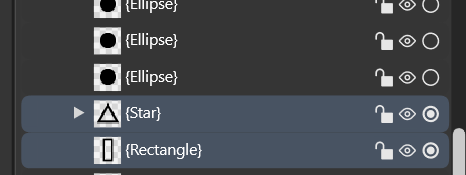
      When I select several objects on the artboard, I can only move one object at a time in the layer panel. I can't select layers with the "Shift" key if the objects are scattered and the "Ctrl" key makes all the layers disappear except for the last selected object.
      0_1668164748806_6a833f97-cde0-4b2e-87f7-21ecd8630a6b-image.png

      After Ctrl:

      0_1668164783659_2c1d2c9d-0404-46bc-88ea-feaa22184abe-image.png

      W11 Pro 25H2 - 12th Gen Intel(R) i7-12700K 3.61 GHz - RAM 64 Go - NVIDIA GF GTX 4070 Ti - Intuos - Dell UP3216Q / Eizo ColorEdge
      W11 Pro 25H2 - 12th Gen Intel(R) i7-12700KF 3.60 GHz -RAM 64 Go - NVIDIA GF GTX 3080 - IntuosPro- ProArt PA329C

      VectorStylerV 1 Reply Last reply Reply Quote 0
      • VectorStylerV Offline
        VectorStyler @B-Vs-V
        last edited by

        @PatrickM In the Layers panel options (panel menu -> Panel Options), disable the Isolate on Control+Click. Then Control can be used to select multiple objects in the panel.

        Also: enabling Select Highlighted and Highlight Selected in the Panel Options, (first column around center), will keep the selection on the canvas and Layers panel in sync.

        \

        B 1 Reply Last reply Reply Quote 1
        • B Offline
          B-Vs-V @VectorStyler
          last edited by B-Vs-V

          @VectorStyler I've tried this but I've got a huge rectangle:

          0_1668171425423_139590b4-7f74-4c54-b8fd-7e3608fbb74d-image.png

          Impossible to see the bottom of the layer panel. I assume this is a bug.

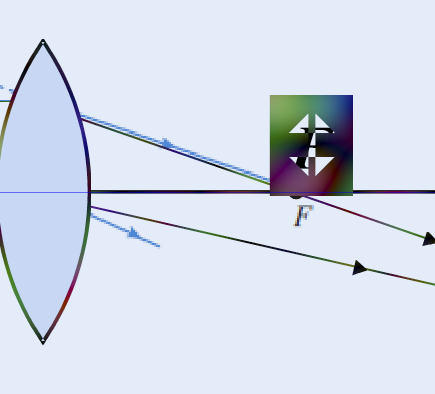
          ... and suddently by clicking on the artboard, I get this:
          0_1668171583284_f4fe5ff0-fa6f-4c54-8335-31c38ea46e46-image.png

          By undoing, I could see that VS add fill noise.

          W11 Pro 25H2 - 12th Gen Intel(R) i7-12700K 3.61 GHz - RAM 64 Go - NVIDIA GF GTX 4070 Ti - Intuos - Dell UP3216Q / Eizo ColorEdge
          W11 Pro 25H2 - 12th Gen Intel(R) i7-12700KF 3.60 GHz -RAM 64 Go - NVIDIA GF GTX 3080 - IntuosPro- ProArt PA329C

          VectorStylerV 1 Reply Last reply Reply Quote 0
          • VectorStylerV Offline
            VectorStyler @B-Vs-V
            last edited by

            @PatrickM Seems that something is dragged from the layers panel. Press Esc to cancel the drag&drop.
            I will try to replicate this.

            B 2 Replies Last reply Reply Quote 0
            • B Offline
              B-Vs-V @VectorStyler
              last edited by

              @VectorStyler 'esc' was my first move but it didn't do anything.

              W11 Pro 25H2 - 12th Gen Intel(R) i7-12700K 3.61 GHz - RAM 64 Go - NVIDIA GF GTX 4070 Ti - Intuos - Dell UP3216Q / Eizo ColorEdge
              W11 Pro 25H2 - 12th Gen Intel(R) i7-12700KF 3.60 GHz -RAM 64 Go - NVIDIA GF GTX 3080 - IntuosPro- ProArt PA329C

              1 Reply Last reply Reply Quote 0
              • B Offline
                B-Vs-V @VectorStyler
                last edited by

                @VectorStyler and yes, I wanted to move objects from a layer to another one.

                W11 Pro 25H2 - 12th Gen Intel(R) i7-12700K 3.61 GHz - RAM 64 Go - NVIDIA GF GTX 4070 Ti - Intuos - Dell UP3216Q / Eizo ColorEdge
                W11 Pro 25H2 - 12th Gen Intel(R) i7-12700KF 3.60 GHz -RAM 64 Go - NVIDIA GF GTX 3080 - IntuosPro- ProArt PA329C

                1 Reply Last reply Reply Quote 0
                • First post
                  Last post