VectorStyler
    • Categories
    • Unread
    • Recent
    • Tags
    • Popular
    • Register
    • Login

    Document corrupts and artwork disappears (Windows 10 Pro with latest updates)
    Scheduled Pinned Locked Moved Resolved Issues
    5 Posts 3 Posters 5.9k Views 2 Watching
    Loading More Posts
    • Oldest to Newest
    • Newest to Oldest
    • Most Votes
    Reply
    • Reply as topic
    Log in to reply
    This topic has been deleted. Only users with topic management privileges can see it.
    • W Offline
      William Kansepa
      last edited by William Kansepa

      I was working on a design, closed the document and shutdown VS. Reopened the file and there's just a blank white space with no artwork, no artboard, no canvas. Also no layers, no links.
      Refer to the attached image:
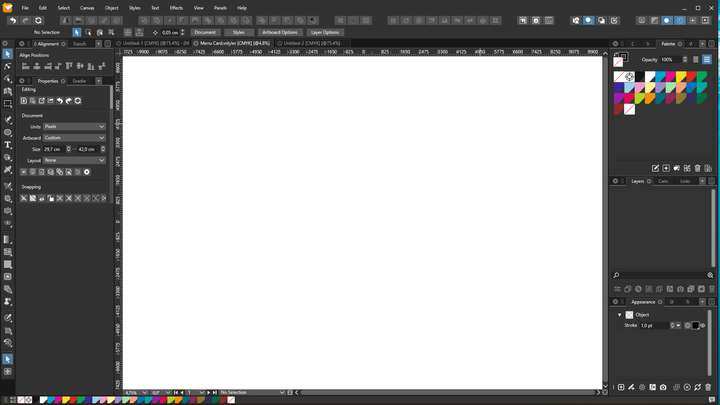
      0_1662456442062_Artwork disappears.png

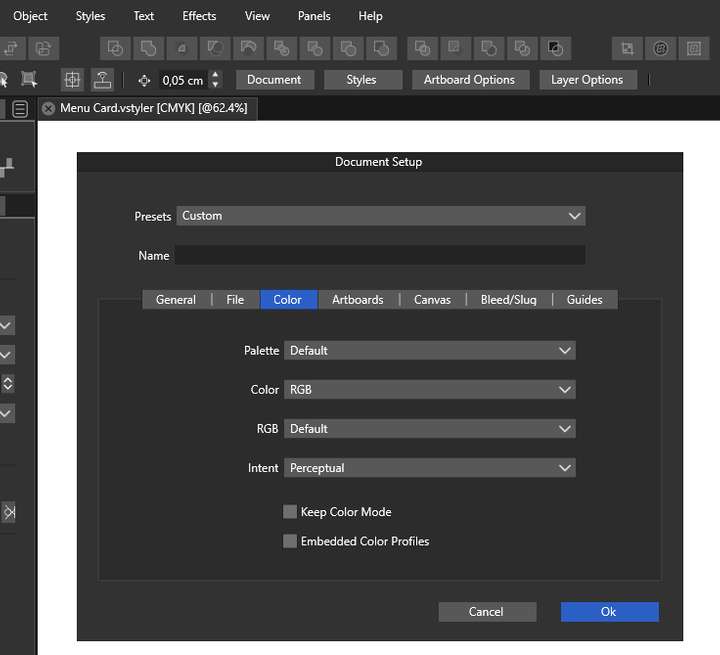
      Also note that the Document Setup has changed from CMYK to RGB. But on document tab it's indicating as CMYK.

      Refer to attachment: 0_1662456679194_Document Setup.png
      HP•Windows 11 Pro•11th Gen Intel(R) Core(TM) i7-1165G7 @ 2.80GHz 2.70 GHz• RAM: 16.0 GB (DDR4)

      b77B VectorStylerV 2 Replies Last reply Reply Quote 1
      • b77B Offline
        b77 @William Kansepa
        last edited by

        @William-Kansepa Is the file size 0 Kb? If not, send it to the developer.
        Also: do you remember what was the last action before closing the file?

        MacBook Pro (Intel) running Monterey 12.6.4

        W 2 Replies Last reply Reply Quote 0
        • W Offline
          William Kansepa @b77
          last edited by

          @b77 Thank you. I have emailed the file to @Vectorstyler

          HP•Windows 11 Pro•11th Gen Intel(R) Core(TM) i7-1165G7 @ 2.80GHz 2.70 GHz• RAM: 16.0 GB (DDR4)

          1 Reply Last reply Reply Quote 1
          • W Offline
            William Kansepa @b77
            last edited by

            @b77 said in Document corrupts and artwork disappears (Windows 10 Pro with latest updates):

            Also: do you remember what was the last action before closing the file?

            1. I had restored the opacity on one of the layers to 100%.

            2. Added a dropshadow onto one of the brushstrokes

            HP•Windows 11 Pro•11th Gen Intel(R) Core(TM) i7-1165G7 @ 2.80GHz 2.70 GHz• RAM: 16.0 GB (DDR4)

            1 Reply Last reply Reply Quote 1
            • VectorStylerV Offline
              VectorStyler @William Kansepa
              last edited by

              @William-Kansepa Got the file, it does seem to be corrupted, and there might be something related also to mistakenly showing CMYK in the title area.

              I will try to figure out what is going on with it, and recover if possible.

              Meanwhile, I recommend doing a clean install of VS and removing all user data from C:\Users<user name>\NumericPath\VectorStyler1.0\

              Some local color configuration might cause this issue, but not sure yet what.

              1 Reply Last reply Reply Quote 0
              • First post
                Last post
