VectorStyler
    • Categories
    • Unread
    • Recent
    • Tags
    • Popular
    • Register
    • Login

    Would be cool to have a Shape outer contour Blur

    Scheduled Pinned Locked Moved Questions and Support
    7 Posts 2 Posters 6.3k Views 2 Watching
    Loading More Posts
    • Oldest to Newest
    • Newest to Oldest
    • Most Votes
    Reply
    • Reply as topic
    Log in to reply
    This topic has been deleted. Only users with topic management privileges can see it.
    • S Offline
      Subpath
      last edited by Subpath

      As it is by now, as far as I know, the entire shape of a vector shape
      becomes a blur area in VS. I would also find it useful if only the
      outer contour could be blurred.

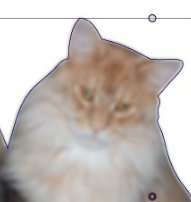
      Here is an example from Magix Graphic Designer.
      0_1649668964633_Xara-Blur.png

      And here VectorStyler
      0_1649668984819_VS Blur.png

      Edited:
      ...in this case the "Preserve Colors" must be checked and "Preserve Alpha" unchecked ... this Info from @vectoradmin
      hat helped to get a better result like this here

      0_1649675342980_VS-Blur-now.png

      Win 11
      CPU: AMD Ryzen 5 9600X, 6-core.
      GPU: Nvidia Geforce RTX 5070.

      VectorStylerV 1 Reply Last reply Reply Quote 0
      • VectorStylerV Offline
        VectorStyler @Subpath
        last edited by VectorStyler

        @Subpath The blur effect should have a "Preserve Alpha" option (in detailed viewing mode with the three doted circle icon at the top right corner).
        When disabled, the alpha is also blurred.

        Send me the image (by email) and I will try to replicate the issue.

        EDIT: in this case the "Preserve Colors" must be checked and "Preserve Alpha" unchecked.

        S 1 Reply Last reply Reply Quote 2
        • S Offline
          Subpath @VectorStyler
          last edited by Subpath

          @vectoradmin

          EDIT: in this case the "Preserve Colors" must be checked and "Preserve Alpha" unchecked.

          Thanks that helped.

          0_1649674346894_VS-Blur-now.png

          0_1649674367387_original.png

          But the main difference between VectorStyler and Magix Graphic Designer
          seems that MGD really blurs the outer contur. While the outer contour in VS stay sharp.
          (Because of Bitmap Effect ?)

          I know we could replicated something similary with the Blend Tool.
          But a Function would appreciated.

          MGD original
          0_1649674470519_MGD-shape.png

          MGD Shape blurred
          0_1649674480909_MGD-shape blured.png

          VS Shape blured
          0_1649674491168_VS-Blur-on-Shapes.png

          Win 11
          CPU: AMD Ryzen 5 9600X, 6-core.
          GPU: Nvidia Geforce RTX 5070.

          VectorStylerV 1 Reply Last reply Reply Quote 1
          • VectorStylerV Offline
            VectorStyler @Subpath
            last edited by

            @Subpath If I blur a shape, with the default options, this is what I get:

            0_1649676358131_blurring.png

            S 1 Reply Last reply Reply Quote 0
            • S Offline
              Subpath @VectorStyler
              last edited by

              @vectoradmin

              yes, i get this too.

              But if you clip a Bitmap in this Shape
              you have to "preserve colors and preserve alpha"
              what would result in sharp conturs.
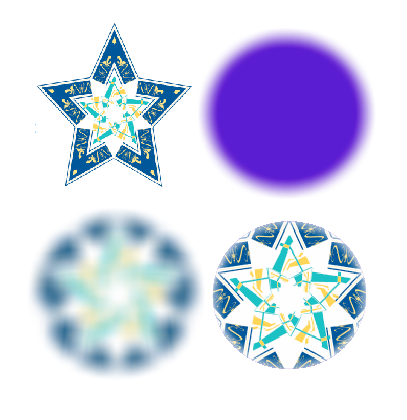
              0_1649677929399_VS-Blur-2.png

              VS-Blur
              0_1649677952630_VS-Blur.png

              MGD-Blur
              0_1649677980993_MGD-Blur.png

              Win 11
              CPU: AMD Ryzen 5 9600X, 6-core.
              GPU: Nvidia Geforce RTX 5070.

              VectorStylerV 1 Reply Last reply Reply Quote 0
              • VectorStylerV Offline
                VectorStyler @Subpath
                last edited by

                @Subpath Got it.

                S 1 Reply Last reply Reply Quote 0
                • S Offline
                  Subpath @VectorStyler
                  last edited by

                  @vectoradmin

                  this is also the case with clipped vector shapes

                  Btw. if you would you could move this thread
                  too the "Question and Support" Section.
                  Because it seems partly solved

                  Win 11
                  CPU: AMD Ryzen 5 9600X, 6-core.
                  GPU: Nvidia Geforce RTX 5070.

                  1 Reply Last reply Reply Quote 0
                  • First post
                    Last post