VectorStyler
    • Categories
    • Unread
    • Recent
    • Tags
    • Popular
    • Register
    • Login

    How to get the interpolated states of blends between shape variations to generate correctly

    Scheduled Pinned Locked Moved Questions and Support
    27 Posts 5 Posters 38.3k Views 4 Watching
    Loading More Posts
    • Oldest to Newest
    • Newest to Oldest
    • Most Votes
    Reply
    • Reply as topic
    Log in to reply
    This topic has been deleted. Only users with topic management privileges can see it.
    • b77B Offline
      b77 @Nils
      last edited by b77

      @Nils I shouldn't have done that? Sorry… 🙂

      Anyway… let me try to help with the question itself.

      Generally speaking, shapes blend better if the start and end shape have the same number of nodes and one start node is similar in position to the other start node, for increased… "shape compatibility".

      Also, it goes without saying that you need to make sure both shapes have the same path direction.

      Sometimes adding nodes in a different place along a path and deleting others might be needed to avoid nasty bending or interpolated paths that look broken.

      If it's something more specific and none of this helps, just post the file here.

      MacBook Pro (Intel) running Monterey 12.6.4

      N 1 Reply Last reply Reply Quote 1
      • N Offline
        Nils @b77
        last edited by

        @b77 No, it was a positive remark by me!

        1 Reply Last reply Reply Quote 1
        • N Offline
          Nils @b77
          last edited by Nils

          @b77 So, one thing I have just noticed is that the new interactive transform shape effect helps tremendously. If you apply the effects congruently and then manipulate their values ( important to add an identity transform to the start shape ) you get proper results.

          BUT: Of course sometimes you want to do blends between more exotic shapes, where shape effects aren't of much help..

          b77B 1 Reply Last reply Reply Quote 0
          • b77B Offline
            b77 @Nils
            last edited by

            @Nils Your question was about blending between shapes with shape effects applied?

            MacBook Pro (Intel) running Monterey 12.6.4

            N 1 Reply Last reply Reply Quote 0
            • N Offline
              Nils @b77
              last edited by

              @b77 No, it was more generally about how to approach this, just general advice. I think it's just a matter of experimentation to get this right. At least I already got it to work with rigorous use of shape effects.

              I think what you said about the same number of nodes will help..

              1 Reply Last reply Reply Quote 0
              • S Offline
                Subpath
                last edited by Subpath

                @Nils ,

                In addition to the points @b77 already mentioned.
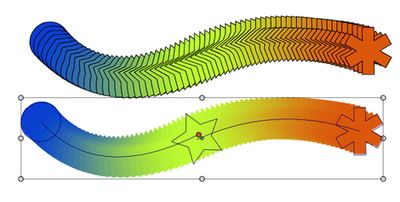
                In VS, like in CorelDraw it is possible to append several blends to each other.
                "Select the last blended Shape and the new Shape and blend it."

                Perhaps this could help, for example, to adjust a copied shape from a blend
                a little bit to the desired shape and use it then as an intermediate Shape for another Blend.
                0_1649305042884_Multi-Blends.png

                Win 11
                CPU: AMD Ryzen 5 9600X, 6-core.
                GPU: Nvidia Geforce RTX 5070.

                1 Reply Last reply Reply Quote 0
                • VectorStylerV Offline
                  VectorStyler @Nils
                  last edited by

                  @Nils said in How to get the interpolated states of blends between shape variations to generate correctly:

                  @vectoradmin Since I got your attention here: I've noticed that it's quite difficult to get the interpolated states of blends between shape variations to generate correctly. Do you have any general advice ( doesn't have to be detailed ) on how to approach this to get more consistency.

                  In some cases the Blend mapping tool might help: https://recordit.co/Sc4zRr81u1

                  Use double clicks to add mapping points at locations along the shapes, and then drag these to the proper place on each shape.

                  N 1 Reply Last reply Reply Quote 2
                  • N Offline
                    Nils @VectorStyler
                    last edited by

                    @vectoradmin After extensive fiddling yesterday I figured out how to get most shapes to blend perfectly.

                    For anyone who might be facing similar issues:

                    • always look closely and ensure the number of nodes is exactly equal in both shapes
                    • ensure symmetry
                    • for example, when blending a circle to a more complex curvey shape have the positions on the left side of the circle be reflected on the right side
                    • when there are tiny artifacts somewhere you know that you probably missed one or more nodes that sit closely together
                    b77B 1 Reply Last reply Reply Quote 3
                    • b77B Offline
                      b77 @Nils
                      last edited by

                      @Nils said

                      • always look closely and ensure the number of nodes is exactly equal in both shapes

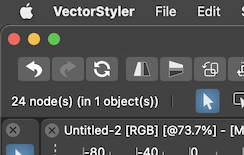
                      Btw, selecting all nodes displays their count on the left side of the context panel:
                      0_1649359507178_nc.png

                      MacBook Pro (Intel) running Monterey 12.6.4

                      1 Reply Last reply Reply Quote 3
                      • BoldlineB Online
                        Boldline
                        last edited by

                        @b77 said in How to get the interpolated states of blends between shape variations to generate correctly:

                        Btw, selecting all nodes displays their count on the left side of the context panel

                        Glad you mentioned this. I had not noticed it and had dedicated the bottom area of the UI for that task. Maybe I'll assign another task down there since it counts for me already at the top as you pointed out

                        🍎 macOS Tahoe 26.2, Mac mini (M1, 2020), Chip Apple M1, Memory 16 GB
                        Cintiq 27QHD Display and LG Ultra HD Display

                        1 Reply Last reply Reply Quote 1
                        • N Offline
                          Nils
                          last edited by Nils

                          With all the tips here and after a lot of experimentation with the process I was able to make a simple "dripping" animation using the blend tool and batch exports.

                          Needless to say, once a certain workflow has been established, which may take some time, one could use VS for much more complex animations, which is a great thing!

                          alt text

                          S b77B 2 Replies Last reply Reply Quote 5
                          • S Offline
                            Subpath @Nils
                            last edited by

                            @Nils

                            smmoooooothhhh result

                            Finally, what tool did you use to make the animation ?
                            I assume you exported single frames, but then ?

                            Win 11
                            CPU: AMD Ryzen 5 9600X, 6-core.
                            GPU: Nvidia Geforce RTX 5070.

                            N 1 Reply Last reply Reply Quote 1
                            • N Offline
                              Nils @Subpath
                              last edited by

                              @Subpath Just google gif maker, then choose one of the various results. Animation is just frames in sequence as you'll know.

                              S 1 Reply Last reply Reply Quote 1
                              • S Offline
                                Subpath
                                last edited by

                                Corel Draw 11 (sadly only this Version i think), had once a vector animation tool
                                called "Corel Rave". Basically it had all the vector tools from CorelDraw
                                with a timeline and a tweening function. You could save your Animation as Flash (.swf).

                                Found a Video here:
                                Corel Rave Video

                                Win 11
                                CPU: AMD Ryzen 5 9600X, 6-core.
                                GPU: Nvidia Geforce RTX 5070.

                                1 Reply Last reply Reply Quote 0
                                • S Offline
                                  Subpath @Nils
                                  last edited by Subpath

                                  @Nils
                                  ...Just google gif maker, then....
                                  thanks for the Info

                                  Win 11
                                  CPU: AMD Ryzen 5 9600X, 6-core.
                                  GPU: Nvidia Geforce RTX 5070.

                                  1 Reply Last reply Reply Quote 0
                                  • b77B Offline
                                    b77 @Nils
                                    last edited by

                                    @Nils Nice! Blending across multiple artboards?

                                    MacBook Pro (Intel) running Monterey 12.6.4

                                    N 1 Reply Last reply Reply Quote 0
                                    • N Offline
                                      Nils @b77
                                      last edited by

                                      @b77 You can just scale any scene down to make the various interpolated states fit the artboard and then increase your resolution correspondingly on export.

                                      Why were you thinking of multiple artboards?

                                      b77B 1 Reply Last reply Reply Quote 0
                                      • b77B Offline
                                        b77 @Nils
                                        last edited by b77

                                        @Nils If the artboard count is the same with the blend count and you place the start object on the first artboard and the end object on the last one, each interpolation would be on the intermediary artboards.

                                        Then after editing the interpolated objects (I guess with your a bit complex animation it involved expanding the blend object and editing the resulting shapes), you can use File > Export Artboards to get all the images for the Animated GIF with one click.

                                        See the attached (very basic) example.

                                        0_1649538422789_Animate.vstyler

                                        MacBook Pro (Intel) running Monterey 12.6.4

                                        N 2 Replies Last reply Reply Quote 0
                                        • N Offline
                                          Nils @b77
                                          last edited by

                                          @b77 said in How to get the interpolated states of blends between shape variations to generate correctly:

                                          I guess with your a bit complex animation it involved expanding the blend object and editing the resulting shapes

                                          Surprisingly not. The above is all done without touching any interpolation results. Vs's blend tool is truly great.

                                          If the artboard count is the same with the blend count and you place the start object on the first artboard and the end object on the last one, each interpolation would be on the intermediary artboards.

                                          That sounds like a great way to emulate a crude timeline! Would also save the hassle of having to align stacked intermediate blends.

                                          1 Reply Last reply Reply Quote 2
                                          • N Offline
                                            Nils @b77
                                            last edited by

                                            @b77 Here's the problem, though? This doesn't seem to work well with non-linear intensities. Any idea how to work around that? For example, if I have a group with two circles and I want to blend vertical translation inside the group non-linearly, then the intensity will reflect in the group's position aswell if I use the groups for the blend.

                                            Also, there doesn't seem to be a way to only blend one axis of translation..
                                            I guess I'll have to expand and then realign..

                                            b77B 2 Replies Last reply Reply Quote 0
                                            • First post
                                              Last post
