Add method to select all color selections in trace panel
-
In the trace panel (loving the improvements in 1.3-1.4!) could we have an easier way to clear out selected colors in the "selected colors" mode? Unless I am missing something, I cannot drag select or select all or groups of colors at one time and delete them.
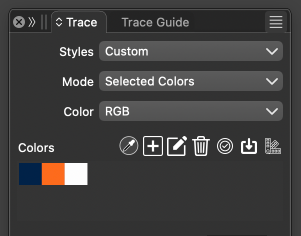
-
@Boldline I will try to add this
-
@VectorStyler on a related note - what about a button that "scans" the selected raster image and delivers samples of the top ____ number of colors in that image? It could be based on how many colors the user specifies they want ahead of time - so if they ask for 5 colors, VS gives them the top 5 colors found.
-
@Boldline said in Add method to select all color selections in trace panel:
VS gives them the top 5 colors found.
The "Fixed Color" mode does that (but it will not show it in a list).