VectorStyler
    • Categories
    • Unread
    • Recent
    • Tags
    • Popular
    • Register
    • Login

    Add shift modifier to drop shadow tool/option to move center point

    Scheduled Pinned Locked Moved Features and Ideas
    2 Posts 2 Posters 4 Views 1 Watching
    Loading More Posts
    • Oldest to Newest
    • Newest to Oldest
    • Most Votes
    Reply
    • Reply as topic
    Log in to reply
    This topic has been deleted. Only users with topic management privileges can see it.
    • BoldlineB Offline
      Boldline
      last edited by

      With the drop shadow tool, could we add the shift modifier to be able to manually move the drop shadow down in a straight line?

      It can be fixed in the drop shadow panel, but it would be nice to be able to hold down shift and drag the drop shadow in a straight line.
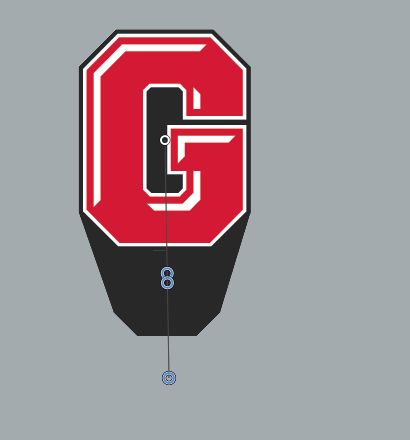
      66b2e4b4-c70b-4c30-978c-06b314cbd931-CleanShot 2026-05-21 at 12.48.00.png

      Could we consider an option to move the center point of the top of the drop shadow tool as well?

      🍎 macOS Tahoe 26.2, Mac mini (M1, 2020), Chip Apple M1, Memory 16 GB
      Cintiq 27QHD Display and LG Ultra HD Display

      VectorStylerV 1 Reply Last reply Reply Quote 1
      • VectorStylerV Offline
        VectorStyler @Boldline
        last edited by

        @Boldline The modifier for angle constraint can be added.

        But the center point has to stay at the center of the object for this effect

        1 Reply Last reply Reply Quote 0
        • First post
          Last post
