Feature Request: Customizable Radial Menu
-
I would like to request a native, customizable radial menu for VectorStyler.
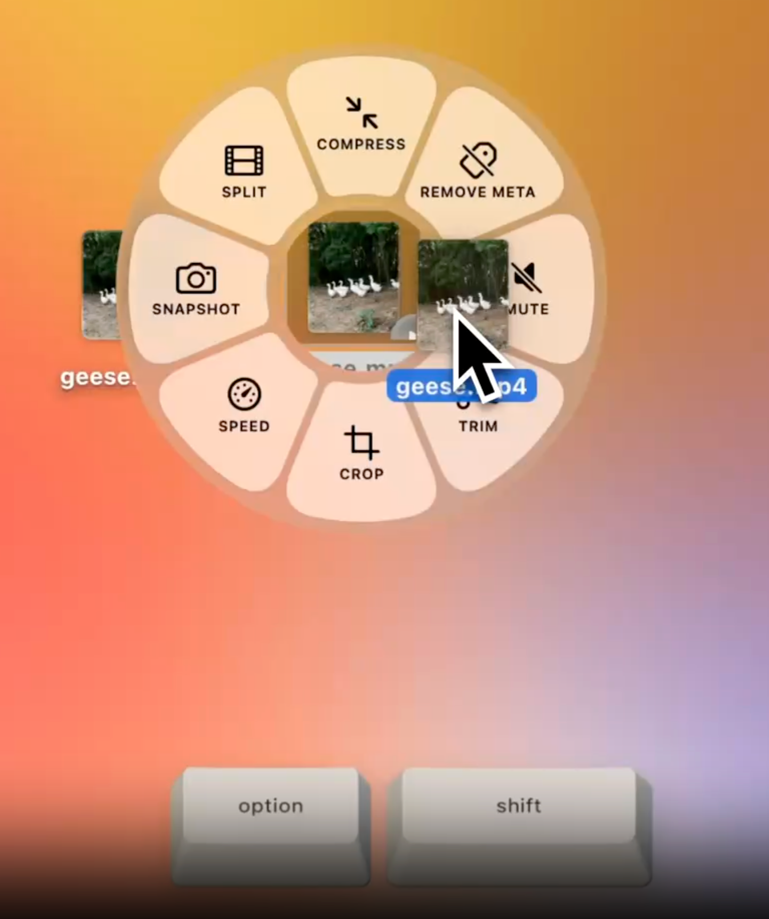
The menu would open around the cursor using an assignable keyboard shortcut, mouse button, or stylus button. Users could place their most-used tools and commands into radial segments, allowing them to select commands without moving the cursor to the toolbar or application menus.
A useful reference is AutoHotPie, which provides customizable pie menus through AutoHotkey. It was previously discussed in the VectorStyler forum as an external workflow enhancement, but native integration would provide better reliability and tighter interaction with VectorStyler.
I was reminded of the radial menu when I found this app online: https://tangerineformac.com/
Suggested capabilities:
- Assign any VectorStyler tool or command to a segment
- Customize the number, order, labels, and icons of segments
- Create multiple radial-menu presets
- Assign different activation shortcuts to each preset
- Support mouse and stylus buttons
- Activate commands by clicking or gesturing toward a segment
- Optionally provide context-sensitive menus based on the active tool or selected object
- Allow nested menus for related commands
- Include import and export of radial-menu configurations
Limiting each menu to approximately eight commands would keep the targets large and make gesture-based selection fast. Multiple presets could cover tools, object operations, alignment, path editing, appearance controls, and other common workflows.
This would reduce cursor travel and dependence on complex keyboard combinations, particularly for pen-display and multi-button mouse users. It would also complement VectorStyler’s existing workspace and shortcut customization features.
🍎 macOS Tahoe 26.2, Mac mini (M1, 2020), Chip Apple M1, Memory 16 GB
Cintiq 27QHD Display and LG Ultra HD Display -
@Boldline I think this was requested before, it is in the backlog, but not for 1.4
-
@Boldline I posted a request for something like this a while back. I looked for alternatives on macOS and found a few. While they aren't dedicated solutions, they offer quite extensive capabilities. The first one is Kando—a free app—and the second is Cirmenu, available on the App Store. There are quite a few apps of this type, but many rely on a subscription model, which isn't really my thing. Check them out; perhaps one of them will meet your expectations.


