VectorStyler
    • Categories
    • Unread
    • Recent
    • Tags
    • Popular
    • Register
    • Login

    Rounded corners regression after applying effect

    Scheduled Pinned Locked Moved VectorStyler 1.2 beta
    7 Posts 4 Posters 31 Views 3 Watching
    Loading More Posts
    • Oldest to Newest
    • Newest to Oldest
    • Most Votes
    Reply
    • Reply as topic
    Log in to reply
    This topic has been deleted. Only users with topic management privileges can see it.
    • W Offline
      William Kansepa
      last edited by

      Steps:

      • Draw a small rectangle and round all corners

      • Apply the drop shadow effect or any other effect

      • Now stretch the rectangle using the top/bottom/side (not the corner) transform handles

      Notice the distorted corners (Refer to attached image).
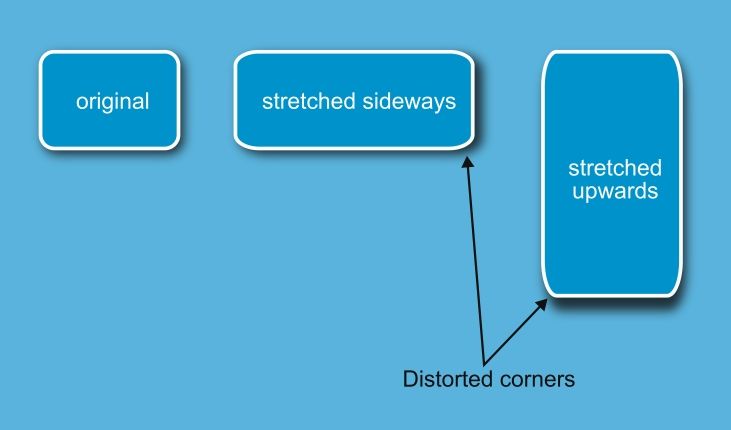
      distorted corners.jpg

      HP•Windows 11 Pro•11th Gen Intel(R) Core(TM) i7-1165G7 @ 2.80GHz 2.70 GHz• RAM: 16.0 GB (DDR4)

      VectorStylerV 1 Reply Last reply Reply Quote 2
      • VectorStylerV Offline
        VectorStyler @William Kansepa
        last edited by

        @William-Kansepa Once an object has an effect like drop shadow, the transforms are applied over the final shape, resulting in distorted corner

        W 1 Reply Last reply Reply Quote 0
        • W Offline
          William Kansepa @VectorStyler
          last edited by

          @VectorStyler said in Rounded corners regression after applying effect:

          @William-Kansepa Once an object has an effect like drop shadow, the transforms are applied over the final shape, resulting in distorted corner

          @VectorStyler Thank you for the explanation.
          However, in other software i.e. Illustrator, CorelDraw and Affinity, to mention but a few, such is not the case. The corners still remain perfect even after stretching the rectangle.

          Could something be done to address this challenge?

          HP•Windows 11 Pro•11th Gen Intel(R) Core(TM) i7-1165G7 @ 2.80GHz 2.70 GHz• RAM: 16.0 GB (DDR4)

          VectorStylerV 1 Reply Last reply Reply Quote 2
          • VectorStylerV Offline
            VectorStyler @William Kansepa
            last edited by

            @William-Kansepa said in Rounded corners regression after applying effect:

            Could something be done to address this challenge?

            I opened a bug on this and will try to find a solution, but it will be limited

            W 1 Reply Last reply Reply Quote 1
            • W Offline
              William Kansepa @VectorStyler
              last edited by

              @VectorStyler said in Rounded corners regression after applying effect:

              I opened a bug on this and will try to find a solution, but it will be limited

              Much appreciated. Thank you.

              HP•Windows 11 Pro•11th Gen Intel(R) Core(TM) i7-1165G7 @ 2.80GHz 2.70 GHz• RAM: 16.0 GB (DDR4)

              1 Reply Last reply Reply Quote 0
              • H Offline
                Honor
                last edited by

                Yes, I was actually about to open a topic about this exact rounded-corner issue. I’d already made a GIF to show it, so I’ll share it here too.
                https://imgur.com/a/2rBG9Y3

                1 Reply Last reply Reply Quote 1
                • L Offline
                  Li Xiao
                  last edited by

                  There is a workaround that requires using Shape Corner in the Effects panel. However, this only works if all four corners of the rectangle have the same radius. If the corner sizes are inconsistent, Shape Corner doesn't allow for individual corner adjustment, and you have to use the Corner panel instead, which makes this workaround unusable for that scenario.

                  https://youtu.be/akNbqo8wqo8

                  1 Reply Last reply Reply Quote 1
                  • First post
                    Last post