VectorStyler
    • Categories
    • Unread
    • Recent
    • Tags
    • Popular
    • Register
    • Login

    XLS for features and ideas - Megathread

    Scheduled Pinned Locked Moved Features and Ideas
    191 Posts 11 Posters 570.1k Views 9 Watching
    Loading More Posts
    • Oldest to Newest
    • Newest to Oldest
    • Most Votes
    Reply
    • Reply as topic
    Log in to reply
    This topic has been deleted. Only users with topic management privileges can see it.
    • VectorStylerV Offline
      VectorStyler @Daniel
      last edited by

      @Daniel said in XLS for features and ideas - Megathread:

      Edge Gradient: http://www.vectorqueue.com/imaxes/scurve.MP4...

      a.k.a Diffusion Curves

      1 Reply Last reply Reply Quote 1
      • DanielD Offline
        Daniel
        last edited by Daniel

        0_1764955302565_1f6eaba9-82a8-4491-8780-c5b817a93ece-image.png

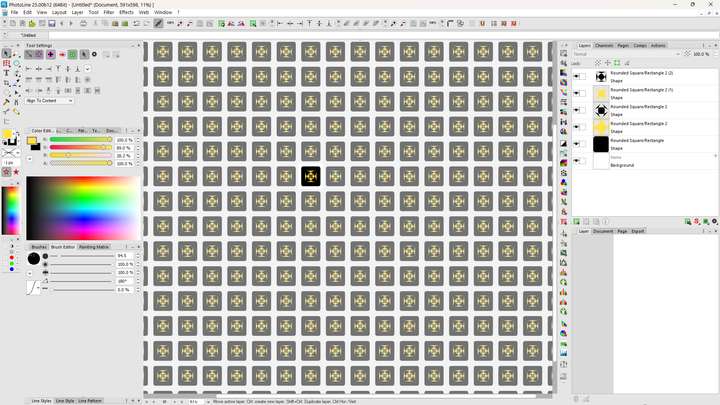
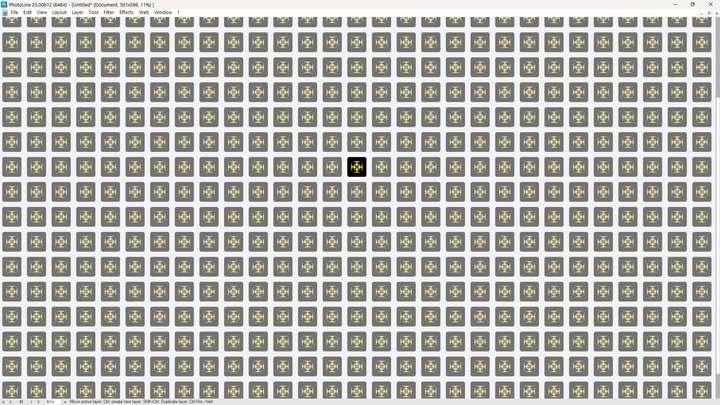
        Pattern-mode: This is actually one of my favourite PL features. It allows you to turn your entire canvas into an instant repeating pattern. This means that you can quickly design a single tile and turn it into a pattern with a single click. You can also quickly hide the panels and see how the pattern looks:
        0_1764955424085_a2a09ae5-8f21-4a00-8977-104dc4df3845-image.png

        Like so!

        It's brilliant. And it is editable live. It is also incredibly fast.

        Work: Windows 11 | Intel i9 14900HS (24 Cores/32 Threads) | GeForce RTX 4070 | 64 GB RAM
        Personal: Windows 11 | Amd Ryzen 9 7950X (16 Core, 32 Threads) | GeForce RTX 3060 | 32 GB RAM

        1 Reply Last reply Reply Quote 0
        • DanielD Offline
          Daniel
          last edited by

          0_1764955733013_2c8b7377-29b0-41f3-abd9-23e76583d2fb-image.png

          Layout view. This was once upon a time available in FreeHand. But now Scribus has revived it. It can either be a dedicated view like outline view or if you zoomout, you see the text density and weights. Brilliant stuff.

          Work: Windows 11 | Intel i9 14900HS (24 Cores/32 Threads) | GeForce RTX 4070 | 64 GB RAM
          Personal: Windows 11 | Amd Ryzen 9 7950X (16 Core, 32 Threads) | GeForce RTX 3060 | 32 GB RAM

          1 Reply Last reply Reply Quote 0
          • DanielD Offline
            Daniel
            last edited by

            0_1764956334587_5e335f5f-47ae-4bda-98f3-9e4bbd497032-image.png

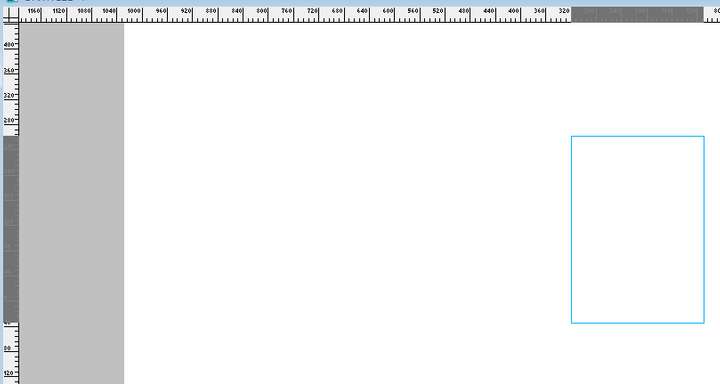
            Ruler highlighting. This helps ensure that when you're moving objects, you can actually see the position without guessing. Available in many, including my beloved FH.

            Work: Windows 11 | Intel i9 14900HS (24 Cores/32 Threads) | GeForce RTX 4070 | 64 GB RAM
            Personal: Windows 11 | Amd Ryzen 9 7950X (16 Core, 32 Threads) | GeForce RTX 3060 | 32 GB RAM

            1 Reply Last reply Reply Quote 0
            • DanielD Offline
              Daniel
              last edited by Daniel

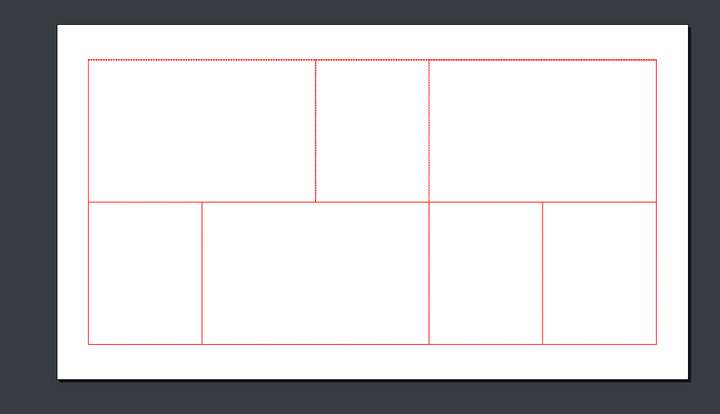
              Guide Layer: This is yet another classic that both Xara and FreeHand got right. You can make a guide out of literally any object. Including texts, entire blends, and so on. You might ask: Well, what's the point of that? It allows you to very quickly generate complex layout grids. Here's how it works:

              I start with a 6X3 Table. And then merge cells very quickly and get this:

              0_1764968622345_9a0568ef-bc95-44af-9a4e-270b884777b9-image.png

              Next I move the Table into the guide layer. 0_1764968717885_50b6d511-0f89-4d8d-a84d-5e4953830107-image.png
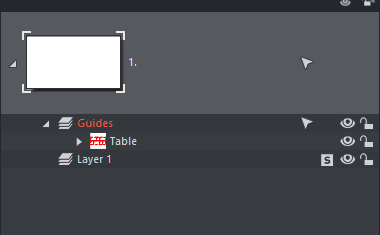
              Voila. Now it's a grid/guide:

              0_1764968672287_2ec01c4d-4bd3-4709-9fd1-0212a0485145-image.png

              This is exceptionally useful.

              Work: Windows 11 | Intel i9 14900HS (24 Cores/32 Threads) | GeForce RTX 4070 | 64 GB RAM
              Personal: Windows 11 | Amd Ryzen 9 7950X (16 Core, 32 Threads) | GeForce RTX 3060 | 32 GB RAM

              VectorStylerV 1 Reply Last reply Reply Quote 1
              • VectorStylerV Offline
                VectorStyler @Daniel
                last edited by

                @Daniel

                Guide Layer

                Exists in VectorStyler also.

                DanielD 1 Reply Last reply Reply Quote 0
                • DanielD Offline
                  Daniel @VectorStyler
                  last edited by

                  @VectorStyler really? Never realised. Let me check.

                  Work: Windows 11 | Intel i9 14900HS (24 Cores/32 Threads) | GeForce RTX 4070 | 64 GB RAM
                  Personal: Windows 11 | Amd Ryzen 9 7950X (16 Core, 32 Threads) | GeForce RTX 3060 | 32 GB RAM

                  VectorStylerV 1 Reply Last reply Reply Quote 0
                  • VectorStylerV Offline
                    VectorStyler @Daniel
                    last edited by

                    @Daniel select the object and then: View -> Guides -> Make Guides

                    A question: how do those other programs handle if these lines, grids, are rotated? how does snapping of a curved shape works at corners of those rotated grids?

                    DanielD 1 Reply Last reply Reply Quote 1
                    • DanielD Offline
                      Daniel @VectorStyler
                      last edited by Daniel

                      @VectorStyler: To be fair, FreeHand's snapping is quite shit. Xara works quite well but once corners are rounded or rotated, it's a bit unreliable. It works sometimes and but not other times. 🙂

                      0_1765026940335_4783d08f-6641-4f6e-b645-85cb52f29ed0-image.png

                      Work: Windows 11 | Intel i9 14900HS (24 Cores/32 Threads) | GeForce RTX 4070 | 64 GB RAM
                      Personal: Windows 11 | Amd Ryzen 9 7950X (16 Core, 32 Threads) | GeForce RTX 3060 | 32 GB RAM

                      1 Reply Last reply Reply Quote 1
                      • DanielD Offline
                        Daniel
                        last edited by Daniel

                        I am designing a typeface, and kept run into the problem of wanting to find hyper-accurate measurements. And I thought, you know what I'd like? A caliper on my screen! And here it is: https://www.iconico.com/caliper - It would be a great addition to have a calliper tool with built in angle measures in VS.

                        Work: Windows 11 | Intel i9 14900HS (24 Cores/32 Threads) | GeForce RTX 4070 | 64 GB RAM
                        Personal: Windows 11 | Amd Ryzen 9 7950X (16 Core, 32 Threads) | GeForce RTX 3060 | 32 GB RAM

                        VectorStylerV 1 Reply Last reply Reply Quote 1
                        • VectorStylerV Offline
                          VectorStyler @Daniel
                          last edited by

                          @Daniel said in XLS for features and ideas - Megathread:

                          I am designing a typeface, and kept run into the problem of wanting to find hyper-accurate measurements. And I thought, you know what I'd like? A caliper on my screen! And here it is: https://www.iconico.com/caliper - It would be a great addition to have a calliper tool with built in angle measures in VS.

                          Not for screen pixels, but all widths/heights path lengths or angles can be measured using Measurement variables created from the Variable Values panel

                          1 Reply Last reply Reply Quote 2
                          • DanielD Offline
                            Daniel
                            last edited by

                            I've been thinking about VS performance, and here's a suggestion:

                            You should be able to switch off anti-aliasing and degrade view quality of just selected objects. This is a golden mean between total degradation of all elements and total quality of all objects. This has always been possible in Xara, where you can select the object with FX and blends, and toggle on anti-aliasing. The left is without anti-aliasing, the right is with. On the same canvas.
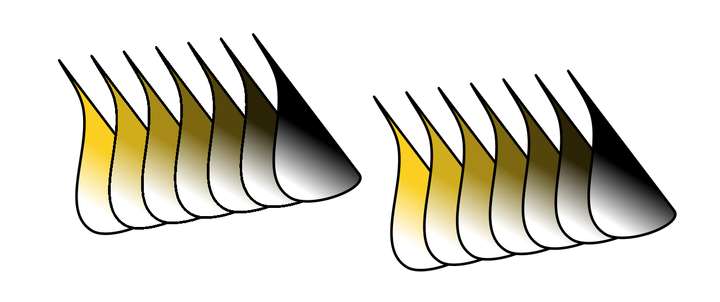
                            0_1767912790824_01e039c2-f71e-477b-9264-5be1700720d5-image.png

                            Work: Windows 11 | Intel i9 14900HS (24 Cores/32 Threads) | GeForce RTX 4070 | 64 GB RAM
                            Personal: Windows 11 | Amd Ryzen 9 7950X (16 Core, 32 Threads) | GeForce RTX 3060 | 32 GB RAM

                            BoldlineB VectorStylerV 2 Replies Last reply Reply Quote 1
                            • BoldlineB Online
                              Boldline @Daniel
                              last edited by

                              @Daniel said in XLS for features and ideas - Megathread:

                              I've been thinking about VS performance,

                              @VectorStyler Does locking a layer and/or turning off the eyeball improve performance?

                              🍎 macOS Tahoe 26.2, Mac mini (M1, 2020), Chip Apple M1, Memory 16 GB
                              Cintiq 27QHD Display and LG Ultra HD Display

                              DanielD 1 Reply Last reply Reply Quote 0
                              • VectorStylerV Offline
                                VectorStyler @Daniel
                                last edited by

                                @Daniel Antialiasing can be turned off, but only for the whole display.

                                There is also an option for complex layers "Image Render" in Object Options (or Render as Image with right click).
                                This will keep the image of the layers that are not changing

                                DanielD 1 Reply Last reply Reply Quote 0
                                • DanielD Offline
                                  Daniel @Boldline
                                  last edited by

                                  @Boldline: unfortunately, that's not what I want. I want to be able to have the whole canvas in view with all objects visible.

                                  Work: Windows 11 | Intel i9 14900HS (24 Cores/32 Threads) | GeForce RTX 4070 | 64 GB RAM
                                  Personal: Windows 11 | Amd Ryzen 9 7950X (16 Core, 32 Threads) | GeForce RTX 3060 | 32 GB RAM

                                  1 Reply Last reply Reply Quote 0
                                  • DanielD Offline
                                    Daniel @VectorStyler
                                    last edited by

                                    @VectorStyler: I tried this too. Didn't note down how it affected performance. Will report back. Thanks!

                                    Work: Windows 11 | Intel i9 14900HS (24 Cores/32 Threads) | GeForce RTX 4070 | 64 GB RAM
                                    Personal: Windows 11 | Amd Ryzen 9 7950X (16 Core, 32 Threads) | GeForce RTX 3060 | 32 GB RAM

                                    1 Reply Last reply Reply Quote 1
                                    • First post
                                      Last post