VectorStyler
    • Categories
    • Unread
    • Recent
    • Tags
    • Popular
    • Register
    • Login

    Search feature in palettes
    Scheduled Pinned Locked Moved Implemented Features
    26 Posts 4 Posters 49.3k Views 1 Watching
    Loading More Posts
    • Oldest to Newest
    • Newest to Oldest
    • Most Votes
    Reply
    • Reply as topic
    Log in to reply
    This topic has been deleted. Only users with topic management privileges can see it.
    • b77B Offline
      b77 @Boldline
      last edited by b77

      @Boldline You can do it with 'Open Palette' from the color bar's menu: https://recordit.co/NsqalOETB3

      MacBook Pro (Intel) running Monterey 12.6.4

      1 Reply Last reply Reply Quote 0
      • BoldlineB Offline
        Boldline
        last edited by

        @b77 thanks - when I do that it opens a finder window where I can choose a palette file. Do I need to export a palette file from another vector app to be able to import into VS? thanks for your help

        🍎 macOS Sequoia 15.3, Mac mini (M1, 2020), Chip Apple M1, Memory 16 GB
        Cintiq 27QHD Display and LG Ultra HD Display

        b77B 1 Reply Last reply Reply Quote 0
        • b77B Offline
          b77 @Boldline
          last edited by b77

          @Boldline You just need to browse to where the other app (say, Illustrator) keeps its palettes (Applications > Adobe Illustrator > Presets > en_US > Swatches) and load it from there.

          The Pantones are in the Color Books folder.

          MacBook Pro (Intel) running Monterey 12.6.4

          1 Reply Last reply Reply Quote 1
          • VectorStylerV Offline
            VectorStyler @Boldline
            last edited by VectorStyler

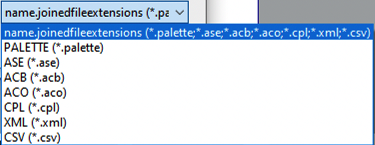
            @Boldline VectorStyler can open color palettes from ASE, ACV, ACO (adobe), CSV (affinity), CPL and XML (corel) formats.
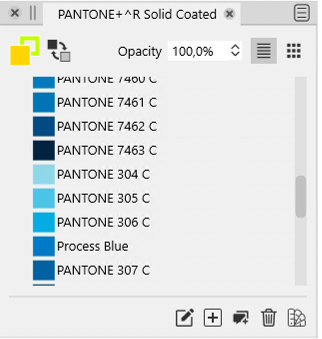
            Palettes can also be opened using the Panels -> Palettes -> Open Palette File, and the Palette panel menu Open Palette command, into a floating palette panel.

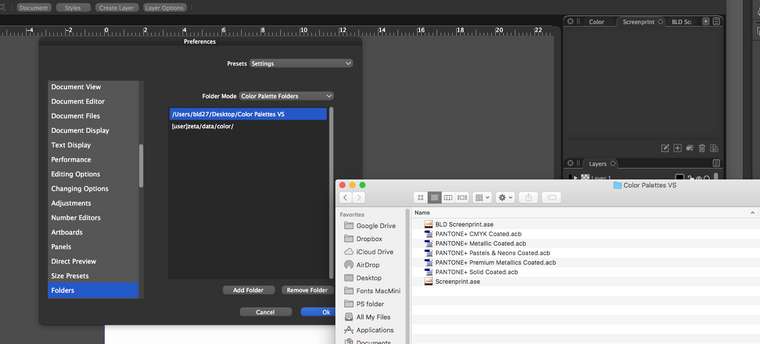
            It is also possible to have these palettes show up in various menus automatically by copying them into a user folder, and adding that folder in Preferences -> Folders and in Folder Mode having Color Palette Folders.

            BoldlineB 1 Reply Last reply Reply Quote 1
            • A Offline
              Arde @Boldline
              last edited by Arde

              @Boldline said in Search feature in palettes:

              @Arde Probably a silly question, but can you tell me how you got pantone palettes inside VS?

              In addition to .ase Adobe Swatch Exchange binary palettes exportable from Adobe apps VS also directly reads the .acb Adobe Color Book palettes that have PMS color definitions, and .XML coded palettes at least from CorelDRAW that also include PMS palettes. It also seems to support CorelDRAW .cpl palettes and some .csv encoded palettes (but not e.g. those included in Affinity apps):
              0_1620364205891_b6d2930d-8729-4495-9c2c-17e8b3b3e35a-image.png

              Description of different software palette file formats can be found e.g. here:
              http://www.selapa.net/swatches/colors/fileformats.php

              EDIT: Well, @vectoradmin posted pretty much the same information but a couple of minutes earlier 🙂

              VectorStylerV BoldlineB 2 Replies Last reply Reply Quote 2
              • VectorStylerV Offline
                VectorStyler @Arde
                last edited by

                @Arde I noticed an error in that screenshot: the All Formats label resource was not defined 🙂 will be fixed in the next build.

                A BoldlineB 2 Replies Last reply Reply Quote 0
                • A Offline
                  Arde @VectorStyler
                  last edited by

                  @vectoradmin

                  Thanks.

                  I noticed that you mention Affinity app palettes as an example of .csv encoded palettes supported but I cannot read any either on the Windows or mac version. On macOS, I cannot go inside an Affinity app container when trying to locate a palette file, either (like I can go inside e.g. in Adobe Photoshop app container).

                  But even when extracted from container to e.g. user document folder, the Affinity .csv palettes do not result in any swatches to be opened in the Palette panel. Could it be that the read function assumes a specific comma separator or character set encoding? On Windows at least they seem to be comma separated and use ANSI encoding, and no string separators.

                  VectorStylerV 1 Reply Last reply Reply Quote 1
                  • VectorStylerV Offline
                    VectorStyler @Arde
                    last edited by

                    @Arde I will look into this.

                    1 Reply Last reply Reply Quote 0
                    • BoldlineB Offline
                      Boldline @Arde
                      last edited by

                      @Arde said in Search feature in palettes:

                      Well, @vectoradmin posted pretty much the same information but a couple of minutes earlier

                      I appreciate all the help!

                      🍎 macOS Sequoia 15.3, Mac mini (M1, 2020), Chip Apple M1, Memory 16 GB
                      Cintiq 27QHD Display and LG Ultra HD Display

                      1 Reply Last reply Reply Quote 0
                      • BoldlineB Offline
                        Boldline @VectorStyler
                        last edited by

                        @vectoradmin said in Search feature in palettes:

                        It is also possible to have these palettes show up in various menus automatically by copying them into a user folder, and adding that folder in Preferences -> Folders and in Folder Mode having Color Palette Folders.

                        I was able to recreate this and get the Pantone acb files to show in VS! this is great!
                        However, when I saved out my custom swatch palette from Illustrator as an ase file, when I open it in VS, it shows as empty. The screenshot I included shows the folder I'm using to store my palettes I want to use in VS, along with the preferences box in VS, and the empty palette panel . Am I missing something?
                        Also, when I first open VS, how do I set the default color palette? I can't tell by clicking on things what palette is being used initially. For example, I'd love for it to be set to the ase swatch file I exported from Illustrator. thanks!
                        0_1620385528963_BLD 2021-05-07 at 06.59.05.png

                        🍎 macOS Sequoia 15.3, Mac mini (M1, 2020), Chip Apple M1, Memory 16 GB
                        Cintiq 27QHD Display and LG Ultra HD Display

                        VectorStylerV 1 Reply Last reply Reply Quote 0
                        • VectorStylerV Offline
                          VectorStyler @Boldline
                          last edited by

                          @Boldline Is it also empty when opened with Panels -> Palettes -> Open Palette File. If so it could be some bug when reading the ASE file. If you send me that ASE file, I will try to find out the issue.

                          BoldlineB 1 Reply Last reply Reply Quote 0
                          • BoldlineB Offline
                            Boldline @VectorStyler
                            last edited by

                            @vectoradmin Yes it is also empty when opened with Panels -> Palettes -> Open Palette File.
                            I'll email you the ase file - thanks!

                            🍎 macOS Sequoia 15.3, Mac mini (M1, 2020), Chip Apple M1, Memory 16 GB
                            Cintiq 27QHD Display and LG Ultra HD Display

                            VectorStylerV 1 Reply Last reply Reply Quote 0
                            • VectorStylerV Offline
                              VectorStyler @Boldline
                              last edited by

                              @Boldline Got the file, and it looks like there is a problem when reading this ASE file. The problem has been identified, and the fix will be in the next build.

                              BoldlineB A 2 Replies Last reply Reply Quote 1
                              • BoldlineB Offline
                                Boldline @VectorStyler
                                last edited by Boldline

                                @vectoradmin Awesome. Glad you were able to find the problem. I curated a palette of colors I use daily in my work and it's great that I can transfer that set over for use in VS. Ideally, I want to make that ase file my default set of colors that opens each time in VS

                                🍎 macOS Sequoia 15.3, Mac mini (M1, 2020), Chip Apple M1, Memory 16 GB
                                Cintiq 27QHD Display and LG Ultra HD Display

                                1 Reply Last reply Reply Quote 0
                                • BoldlineB Offline
                                  Boldline @VectorStyler
                                  last edited by

                                  @vectoradmin said in Search feature in palettes:

                                  @Arde I noticed an error in that screenshot: the All Formats label resource was not defined will be fixed in the next build.

                                  Another good reason to always be talking about features in VS - you never know when something unexpected gets noticed and fixed.

                                  🍎 macOS Sequoia 15.3, Mac mini (M1, 2020), Chip Apple M1, Memory 16 GB
                                  Cintiq 27QHD Display and LG Ultra HD Display

                                  1 Reply Last reply Reply Quote 1
                                  • A Offline
                                    Arde @VectorStyler
                                    last edited by

                                    @vectoradmin said in Search feature in palettes:

                                    Got the file, and it looks like there is a problem when reading this ASE file. The problem has been identified, and the fix will be in the next build.

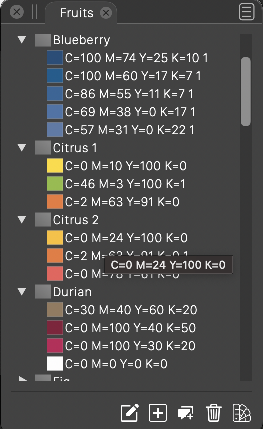
                                    I tested this by exporting a palette with AI Fruits palette included in swatches, and VS imported that without any problems both on macOS and Windows. The source was created on Windows using AI CS6.
                                    0_1620407139017_e1878efe-6b0e-43c3-90f4-1daa3058b160-image.png

                                    Is the error related to later version of AI, or having something unexpected in the swatches? I suppose AI automatically excludes gradients and the kinds of swatches that are not supported in an ASE file?

                                    BoldlineB VectorStylerV 2 Replies Last reply Reply Quote 0
                                    • BoldlineB Offline
                                      Boldline @Arde
                                      last edited by Boldline

                                      @Arde would you like me to send you the ase file that I tried to use? I also use CS6 but on a mac. I can send you my email in the PM. @vectoradmin said he found the issue with my ase file, but I'd be curious if you could open it without issue like you did the fruit palette.

                                      🍎 macOS Sequoia 15.3, Mac mini (M1, 2020), Chip Apple M1, Memory 16 GB
                                      Cintiq 27QHD Display and LG Ultra HD Display

                                      A 1 Reply Last reply Reply Quote 0
                                      • A Offline
                                        Arde @Boldline
                                        last edited by

                                        @Boldline said in Search feature in palettes:

                                        @Arde would you like me to send you the ase file that I tried to use? I also use CS6 but on a mac. I can send you my email in the PM.

                                        Yes, that's fine.

                                        1 Reply Last reply Reply Quote 0
                                        • VectorStylerV Offline
                                          VectorStyler @Arde
                                          last edited by

                                          @Arde The error can be fixed in the ASE import of VectorStyler. Various Adobe versions are not very consistent when writing files, and in some ASE files the header info (palette name, etc) is missing.

                                          1 Reply Last reply Reply Quote 0
                                          • BoldlineB Offline
                                            Boldline
                                            last edited by

                                            This was solved for me in the newest beta, thank you!

                                            🍎 macOS Sequoia 15.3, Mac mini (M1, 2020), Chip Apple M1, Memory 16 GB
                                            Cintiq 27QHD Display and LG Ultra HD Display

                                            BoldlineB 1 Reply Last reply Reply Quote 0
                                            • First post
                                              Last post
