Bezigon Tool
-
@Daniel said in Bezigon Tool:
Install FreeHand using Sandboxie within a Sandboxed locatio...
Ah, interesting. I have very little experience with sandboxing, virtualization and so on. I do have FreeHand running on an M2 Mac in Windows via Parallels, but I guess it's a different creature.
I still find the native installation on Win is well behaved - and completely legit, as I have the original installation media and valid license card from back then...
Still many basic features in this 2005 application that work so well, Illustrator doesn't come close now 20 years later, Bezigon as a case in point!
-
@larsherold: Yes, FH is still to be bested. This is because FreeHand is an outgrowth of intensely vector focused software: Altsys' Fontographer. Released 30 years ago, it is what introduced Bezigon. Building FH on top of Fontographer engine gave them extraordinary power. Adobe sucks compared to it.
Virtualisation is easier than people think. Sandboxie is a shareware. You simply need to start it, and then run the installation inside a sandbox. Now the contents inside the sandbox are completely isolated - this means that they're device independent. Hence completely portable.
 There are many tutorials out there on this if you want to try. I do it this way because it means that should I change my computer in the future, and some Windows update breaks FreeHand, then I have a portable edition that I don't have to install.
 -
@vectorstyler: We thought a bit more about this. There is actually a far more elegant solution to this problem of tangent nodes than introducing a separate node type. It is simple. All you need is a tool setting option that says: "Snap" or "Lock Handle to Chords" - that's it! Now you have a tangent node.
With the node tool active, you click on a node, and then toggle on "Lock Handles to Chords" - the handle of that node is now locked to the chord of adjacent nodes. Chord being the straight line between two nodes.
This might be far simpler than introducing a third node type. What do you think folks? @larsherold?
Fuck! The more I think about this, the more delightful it is - it is so, so simple!
Work: Windows 11 | Intel i9 14900HS (24 Cores/32 Threads) | GeForce RTX 4070 | 64 GB RAM
Personal: Windows 11 | Amd Ryzen 9 7950X (16 Core, 32 Threads) | GeForce RTX 3060 | 32 GB RAM -
@Daniel I'm confused about case (13) of the Four Nodes section of the "Bezigon - Permutations - Corner, Smooth and Cusp.pdf"
In this case the sequence is MC, PC, MC, PC, MC. Which should result in a smooth closing node (starts and ends with a smooth node).
Could it be that the sequence is wrong? -
@VectorStyler: No, The sequence produces the correct result. The reason is simple: The first click is modified twice. Once when it was place and the second time when when it was closed. And node 2 and node 4 are both sharp nodes, hence the top node becomes a cusp node with the handles of both pointing at the chord.
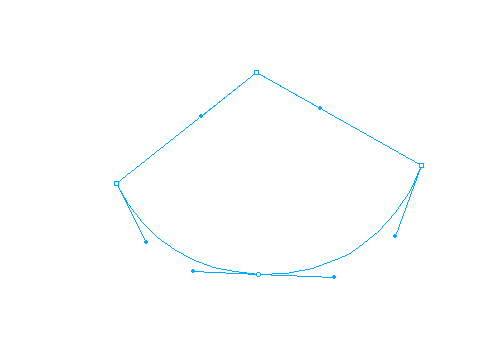
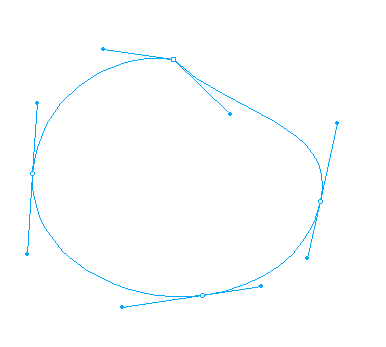
If all the nodes are smooth, including the closing click, the top node still is cusp and the handles are still on the chord to node 2 and 4. This is because node 1 was modified twice, once when placed and once when closed.
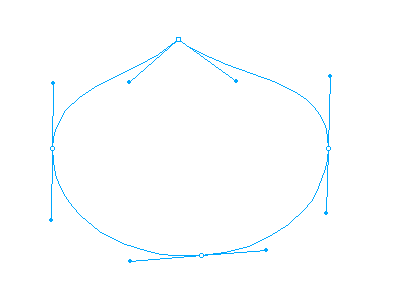
Consider this: The first node is placed as a square node, but all the others are modifier clicked. It still correctly produces a cusp at the top. The segment between node 1 and 2 on the left is approximated to a circle, as it should be. The segment between 1 and 4 on the right is cusped, and the handle points at node 4, the chord to node 4.
-
@vectorstyler: I discussed it with Taras, my colleague. I think you should hold on the implementation of Tangent node. He agrees with me that it is just a matter of introducing a single new flag for each of the existing nodes rather than introducing a whole new node type. It is far more elegant, far simpler. Meanwhile, you can just work on getting the two main node types right. Sharp (&Cusp) and Smooth (&Symmetric).
-
@Daniel said in Bezigon Tool:
This might be far simpler than introducing a third node type. What do you think folks? @larsherold?
It makes sense, as I guess the FH tangent Connector point can be viewed as a special case of a Cusp or Smooth Node.
But the Connector Node is only useful/sensible as a tangent constraint if the neighbouring segment is straight. So when you "lock the handle of a smooth node e.g. to the chord" to enforce tangency, you will have to decide which handle to lock and staighten up the segment by retracting the handle downstream. (Or lock the downstream handle to the chord as well.)
Actually the FH Connector node has two handles as well. The hidden handle can be extracted by Alt-dragging from the triangular node.
Only, the second handle direction is locked, and seems arbitrary, like it has an undefined value when hidden.The FH Connector node can be forced to expose its second handle when placing it, resulting in a sort of direction-frozen Cusp node.
Use the FH Bezigon tool to place 3 nodes: 1 smooth, 1 connector, 1smooth: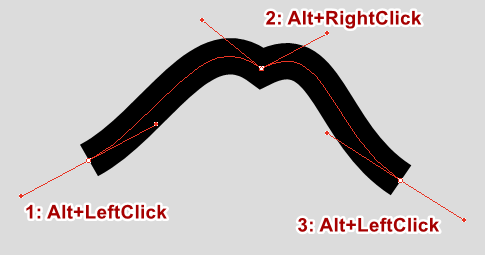
The middle point is a Connector node alright, but not much tangency going on.The "stray" outgoing handle can be retracted, and the Connector node behaves like a tangent node again...
BR/ Lars Herold
-
@larsherold: Yes, all of these can be reproduced with a simple flag for each of the two types of nodes. Including the two handled connector node. Thankfully, because we have mapped out every single rule, writing it back into the simple two node scheme is easy. Thank you for confirming this!
Technically, and ideally, a tangent node is only every useful if it follows one direction. We can force this in the tool setting, but I'd rather not. FreeHand allows you the choice to have both handles available which you can manually collapse. I prefer that freedom.
-
@Daniel said in Bezigon Tool:
FreeHand allows you the choice to have both handles available
You are right, the direction of the second (rarely seen) Connector handle is not arbitrary at all. Both visible Connector handles lie on the chord extension towards each neighbour node! Makes sense. You can retract either, and depending on what segment is (made) straight, you have tangency in one direction or the other..
There would have to be some visible indication that a handle is locked to a chord, and a means of unlocking it, I guess.
-
So the ideal way to proceed with this so that we can test it one step at a time is this:
--> Fix bezigon rules for smooth and cusp as it currently exists in VS.
--> Introduce flags for tangent nodes so that the handle is locked to chord and aligns to the chords of neighbouring nodes. --> Release --> Test --> Fix.
--> Introduce true circle option from TikZ Lib --> Release -->Test --> Fix.
--> Introduce handle clamps from Blender --> Release --> Test --> FixYou get this right, you'll have outright the single best pen tool option in the market.
-
@larsherold: Yup, figuring this out has been notoriously difficult. It is right under your nose and extremely simple once you see it. So is the 0.39 X Segment = Handle Length. Already worked out by several others. But putting these two pieces together has taken so long. More intelligent people would have seen it right away.
-
@larsherold: Yes. We can simply turn it into a triangle! Just like in FreeHand. Except it's just a locked node!
-
Re: ”More intelligent people would have seen it right away”.
All due respect - I think the level of bezier-intelligence is maxed out in this neighbourhood..
Impressive dedication to the Bezigon implementation!

