VectorStyler
    • Categories
    • Unread
    • Recent
    • Tags
    • Popular
    • Register
    • Login

    Bezigon Tool

    Scheduled Pinned Locked Moved Features and Ideas
    29 Posts 4 Posters 9.8k Views 4 Watching
    Loading More Posts
    • Oldest to Newest
    • Newest to Oldest
    • Most Votes
    Reply
    • Reply as topic
    Log in to reply
    This topic has been deleted. Only users with topic management privileges can see it.
    • DanielD Offline
      Daniel @VectorStyler
      last edited by

      @VectorStyler

      4ede7494-d0df-44d4-8ac7-2d64b8b93e00-image.png

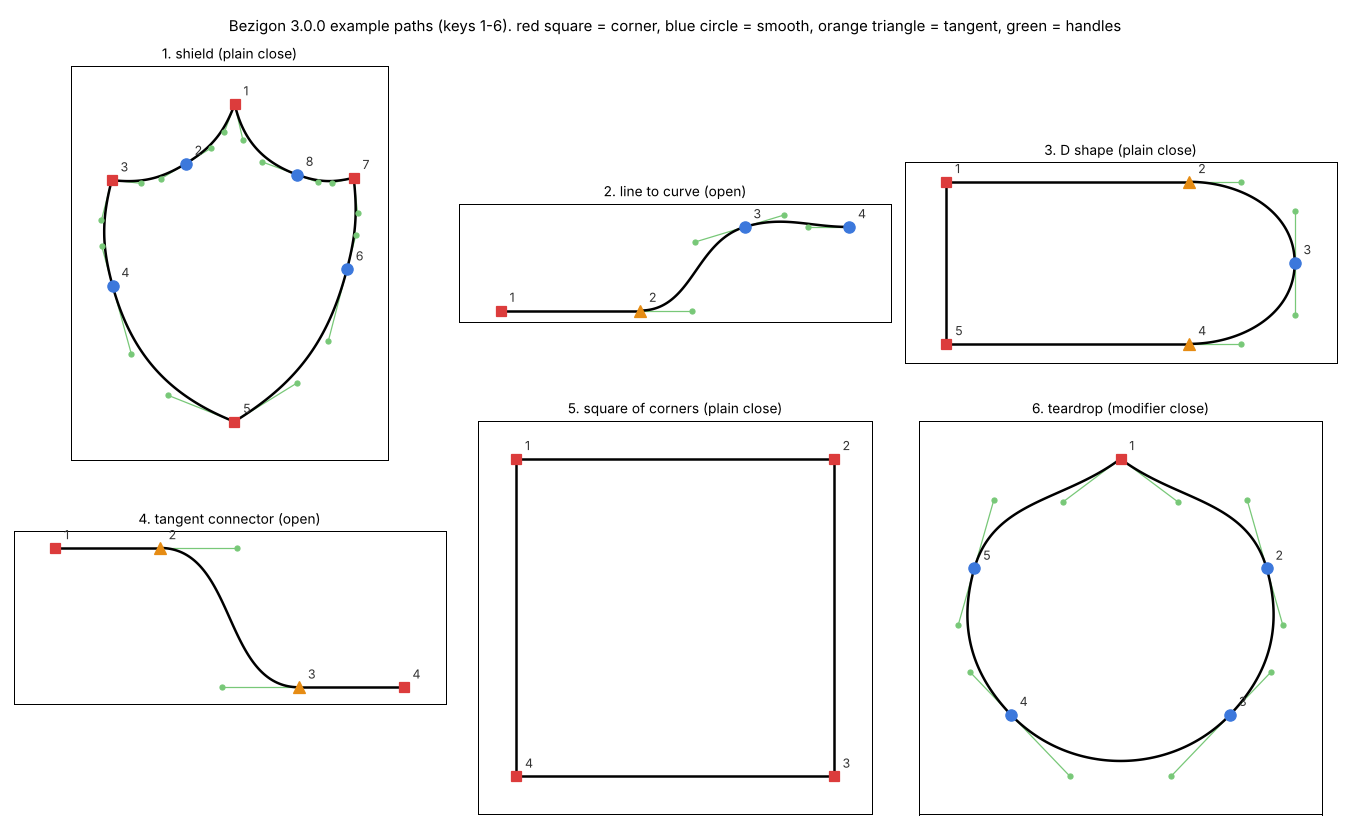
      There were still some edge cases to work out in the code I shared. Which we eventually figured out by comparing outputs exhaustively. In the process of figuring it out, we also cracked Tangent Nodes... Tangent node handles can only be moved along the set line. It is extremely useful when you want to get perfectly smooth transitions.

      I am going to post V 3 Code so you can study and integrate. Doing the last bit of checks. Again, MIT License.

      Work: Windows 11 | Intel i9 14900HS (24 Cores/32 Threads) | GeForce RTX 4070 | 64 GB RAM
      Personal: Windows 11 | Amd Ryzen 9 7950X (16 Core, 32 Threads) | GeForce RTX 3060 | 32 GB RAM

      VectorStylerV 2 Replies Last reply Reply Quote 2
      • DanielD Offline
        Daniel @VectorStyler
        last edited by Daniel

        @VectorStyler; Also if you want to test Bezigon at your end, use this file - Bezigon Tester.pdf - It lists out 16 permutations. You can compare these permutations against the code V3 code I'll post. If VS does not produce identical results, then its not right. There are still edge cases to work out.

        PC means - Plain click
        MC means - Modifier click

        Take note that these 16 cases only check for smooth, cusp and sharp nodes. Tangent nodes are ignored in these combinations for the present moment.

        Work: Windows 11 | Intel i9 14900HS (24 Cores/32 Threads) | GeForce RTX 4070 | 64 GB RAM
        Personal: Windows 11 | Amd Ryzen 9 7950X (16 Core, 32 Threads) | GeForce RTX 3060 | 32 GB RAM

        VectorStylerV 1 Reply Last reply Reply Quote 1
        • VectorStylerV Offline
          VectorStyler @Daniel
          last edited by

          @Daniel I will test this. Thanks!

          1 Reply Last reply Reply Quote 0
          • VectorStylerV Offline
            VectorStyler @Daniel
            last edited by

            @Daniel Is there an app, where the control points are set manually?

            DanielD 1 Reply Last reply Reply Quote 0
            • VectorStylerV Offline
              VectorStyler @Daniel
              last edited by

              @Daniel And what key modifier is used to get the tangent case (orange triangle)?

              DanielD 1 Reply Last reply Reply Quote 0
              • DanielD Offline
                Daniel @VectorStyler
                last edited by

                @VectorStyler: In FreeHand, it is Alt Right-Click or more simply - Modifier-Right Click. This can't be changed in FreeHand. However, this is not friendly. We should be able to assign our own key combination.

                Whilst working through this, we stumbled upon an accidental behaviour which would be nice to have if possible. "Reset Handle Lengths" - this means you're able to click on a node at any time during the drawing and press R - to reset it to what the bezigon algorithm would have approximated it to when the node was first laid down.

                https://ibb.co/pjhS4tRF - Like so.

                Work: Windows 11 | Intel i9 14900HS (24 Cores/32 Threads) | GeForce RTX 4070 | 64 GB RAM
                Personal: Windows 11 | Amd Ryzen 9 7950X (16 Core, 32 Threads) | GeForce RTX 3060 | 32 GB RAM

                VectorStylerV 1 Reply Last reply Reply Quote 1
                • VectorStylerV Offline
                  VectorStyler @Daniel
                  last edited by

                  @Daniel I will make a new build with what I have now (may take a day or two).
                  And then we can improve on that.

                  Thanks a lot for the help!

                  DanielD 1 Reply Last reply Reply Quote 2
                  • DanielD Offline
                    Daniel @VectorStyler
                    last edited by

                    @VectorStyler: Please hang on. To spare you some effort, we've worked out every last bit of kink. Would you rather I give you the clean code for just the sharp, cusp and smooth node - ignoring Tangent Node? I have that ready to go. But tangent node conversions are turning into a devilishly tricky problem because converting a smooth/sharp node into a tangent depends very heavily on the neighbouring nodes. And this means, both the sequence of conversion and the type of neighbouring node matters. That is proving difficult. Seriously, I am so tempted to decompile and look into the FreeHand code. But I won't! FUCK ADOBE for not doing the right thing.

                    Work: Windows 11 | Intel i9 14900HS (24 Cores/32 Threads) | GeForce RTX 4070 | 64 GB RAM
                    Personal: Windows 11 | Amd Ryzen 9 7950X (16 Core, 32 Threads) | GeForce RTX 3060 | 32 GB RAM

                    1 Reply Last reply Reply Quote 2
                    • DanielD Offline
                      Daniel @VectorStyler
                      last edited by Daniel

                      @VectorStyler What do you mean? FreeHand allows you to set every single point manually.
                      80cfb849-6e0e-4fdf-a4c5-273d9452edff-image.png

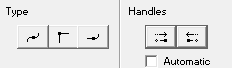
                      Those are the three types of points. Smooth, Sharp, and Tangent. And on the right you have the option to convert each of the sides a smooth node to a cusp node.

                      For instance say you have a smooth node, with two symmetric handles. Pressing the left hand side handle button converts that portion of the shape into a straight line. When you press the right hand side handle button, the second handle also collapses, meaning you have a square node.

                      Work: Windows 11 | Intel i9 14900HS (24 Cores/32 Threads) | GeForce RTX 4070 | 64 GB RAM
                      Personal: Windows 11 | Amd Ryzen 9 7950X (16 Core, 32 Threads) | GeForce RTX 3060 | 32 GB RAM

                      VectorStylerV 1 Reply Last reply Reply Quote 1
                      • VectorStylerV Offline
                        VectorStyler @Daniel
                        last edited by

                        @Daniel said in Bezigon Tool:

                        What do you mean? FreeHand allows you to set every single point manually.

                        Yes, with the Node tool.

                        I meant if there is a way to set handles while drawing with the bezigon tool.

                        DanielD 1 Reply Last reply Reply Quote 1
                        • DanielD Offline
                          Daniel @VectorStyler
                          last edited by

                          @VectorStyler: Yes, FreeHand allows you to set each point manually. Plain click - Square node, Alt click - Smooth node, alt -right click - tangent node. Alternatively you can choose which nodes you want to place from the side panel shown in my previous comemnt.


                          Work: Windows 11 | Intel i9 14900HS (24 Cores/32 Threads) | GeForce RTX 4070 | 64 GB RAM
                          Personal: Windows 11 | Amd Ryzen 9 7950X (16 Core, 32 Threads) | GeForce RTX 3060 | 32 GB RAM

                          1 Reply Last reply Reply Quote 1
                          • First post
                            Last post